
Attackers exploit organization name and team invite features to deliver vishing and spam from trusted domains.
Cybercriminals have found a new way to abuse OpenAI’s collaboration features to send scam messages that appear to come from legitimate company addresses.
According to findings by Kaspersky analysts, attackers are using OpenAI’s “organization creation” and “invite your team” functions — both intended for internal use — to send spam and phishing emails through official OpenAI mail servers. This makes the messages technically authentic at first glance, bypassing some common email filters.
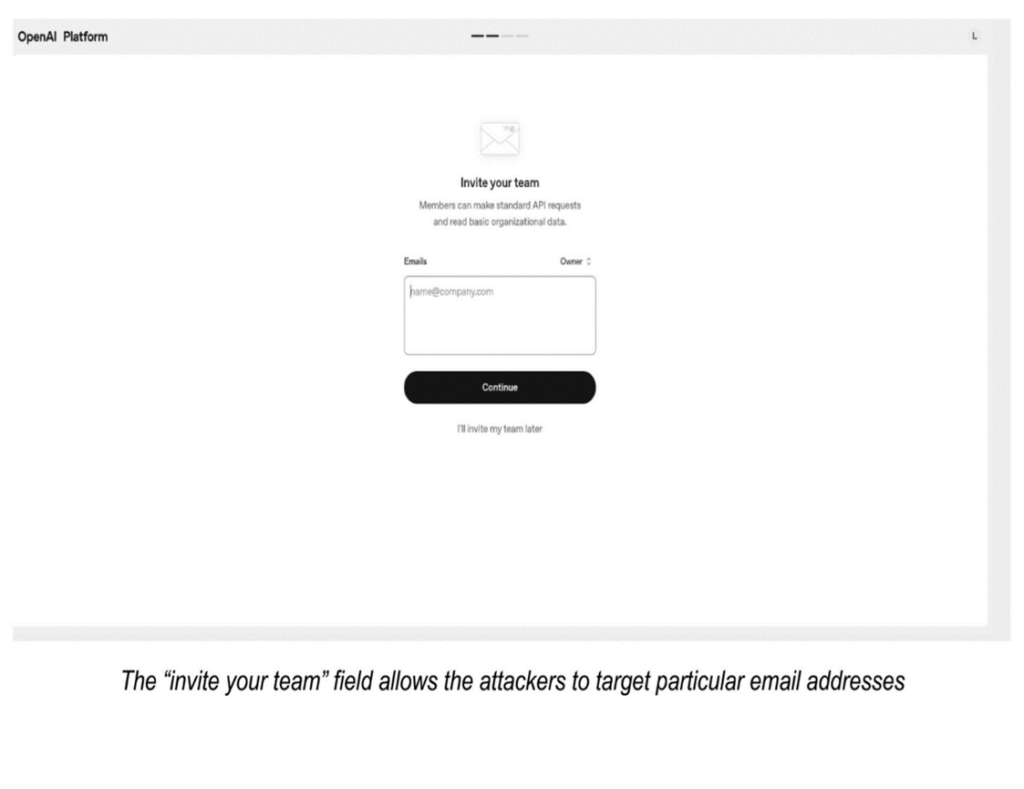
The scheme relies on the ability to name an “organization” during setup with any string of text or symbols. Attackers fill that field with deceptive wording, links, or phone numbers, which then appear in the body of the invitation email. After creating the organization, they use the “invite your team” option to target specific email addresses, delivering their fraudulent content from a legitimate OpenAI domain.
Variations on a theme
Researchers have observed several variations of this attack. Some emails promote adult websites or dubious services, while others impersonate billing notifications, claiming a subscription has been renewed for a large sum. Recipients are then urged to call a phone number to dispute the charge — a common vishing technique used to extract payment or personal information.
This form of abuse highlights a broader security concern: everyday platform features can be weaponized for social engineering. By inserting malicious text into fields not traditionally associated with content distribution, scammers can sidestep conventional detection systems and exploit users’ trust in reputable brands.
Hardening defenses against this attack
According to the Kaspersky security team, organizations need to:
- Treat unsolicited invitations from any platform with suspicion, even if appearing to originate from trusted sources
- Carefully inspect clickable URLs for suspicious domains before launching any link
- Avoid calling any phone numbers indicated in suspicious emails — it is best to find the phone number on the official webpage of this service, and use that number to initiate contact
- Report suspicious emails to the platform provider and use multi-factor authentication for all accounts
- Install multi-layered email defense solutions that provide robust protection against a wide range of evolving threats and offering anti-phishing features designed to help intervene in phishing attacks and improve overall cybersecurity
For organizations, implementing multi-factor authentication and security tools that monitor outbound and inbound messages for anomalies can further reduce risk.